
How a Build Process Crashed My 8-Core 8GB Server: A Real OOM Troubleshooting Story
2025/12/11

How a Build Process Crashed My 8-Core 8GB Server: A Real OOM Troubleshooting Story

A detailed account of troubleshooting server crashes caused by Next.js builds triggering OOM, and how adding Swap solved the memory spike issues in a multi-container environment.

In daily development, server performance bottlenecks usually come from CPU or disk I/O. But this time, I encountered something completely unexpected—an 8-core 8GB Hong Kong server that would freeze or crash during project deployment.

The most absurd part: it was just building a frontend project, and the server would instantly become unresponsive, even dropping SSH connections.

This recurring issue forced me to investigate the root cause thoroughly.


The Problem: 8GB Memory + Multiple Containers, Seemingly Sufficient Yet Frequently Crashing

My server environment:

  • 8-core CPU, 8GB RAM
  • Ubuntu 20.04
  • Using Dokploy to manage multiple Docker containers
  • One backend service
  • One blog site
  • One analytics service
  • Plus database, Redis, proxy services and other dependencies

On the surface, 8GB should be plenty for these lightweight services.

But in reality, during project deployment and build, the server would:

  • Freeze, unable to accept any commands
  • Drop SSH connections automatically
  • All containers would suddenly stop
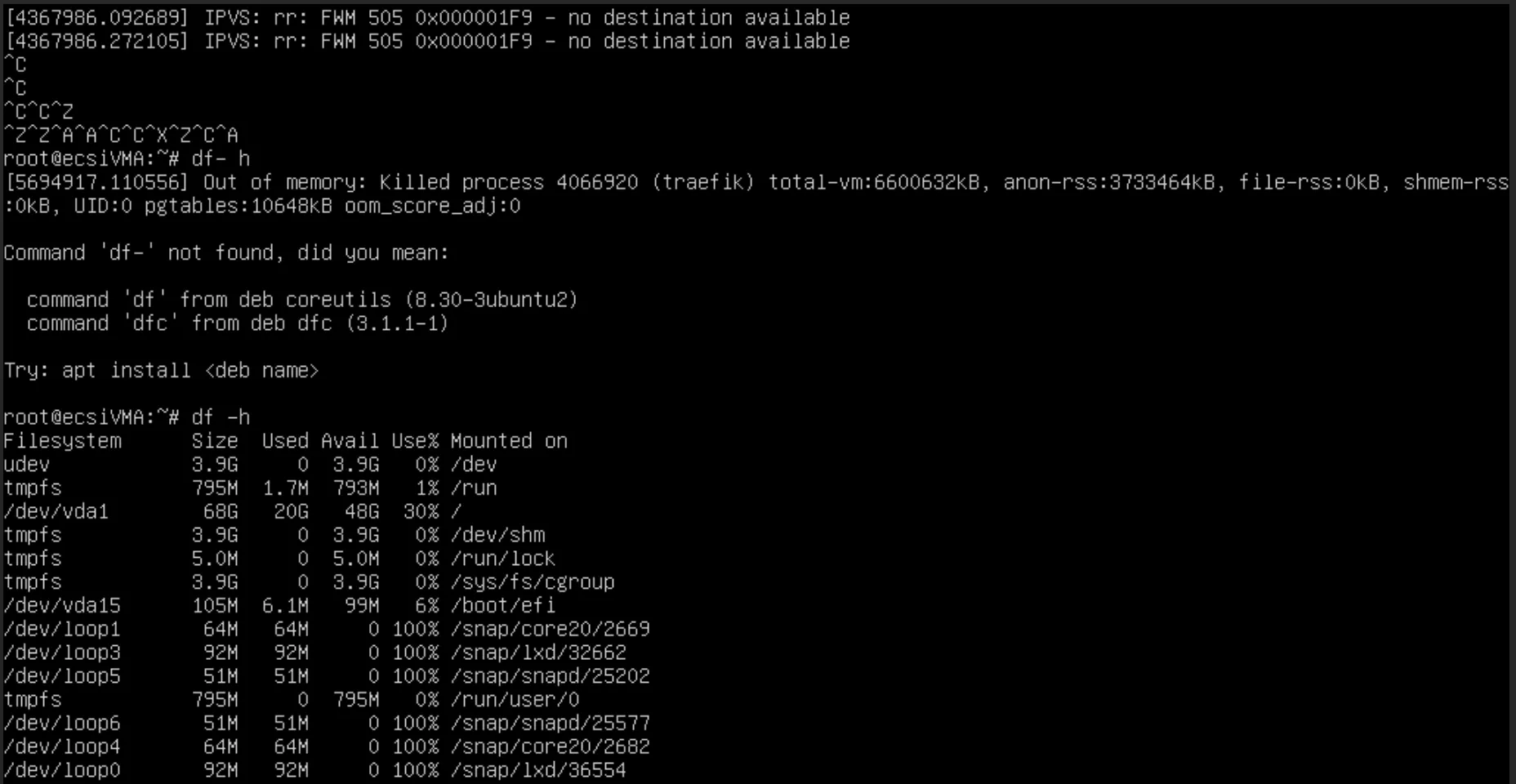
  • Logs showed the system triggering OOM Kill (Out of Memory forced process termination)

This made me realize the problem was far more complex than just insufficient resources.

Out of Memory error


Deep Investigation: The Killed Process Wasn't the Build, It Was the Proxy

After checking the kernel logs:

Out of memory: Killed process ... (proxy service)

This meant:

  • It wasn't the business service crashing
  • It wasn't the build process being killed
  • It was the proxy layer process being terminated by the system

This is the classic Linux OOM (Out Of Memory) mechanism: when memory is insufficient, the system prioritizes killing processes that consume more memory but are relatively less important, to maintain overall system availability.

What appeared to be "server freeze" was actually the system's emergency self-rescue triggered by build-time memory spikes.


What Actually Happens During Build?

The deployment process runs Next.js, TypeScript, Webpack/Turbopack builds, which involve:

  1. Compiling numerous TS/TSX files
  2. Analyzing hundreds of dependency packages
  3. Building the dependency graph
  4. Pre-rendering pages
  5. Tree shaking
  6. Compression and bundling
  7. Parallel builds enabled by default (multi-threaded)

These steps cause peak memory usage. In real projects, build peaks can reach:

  • 4GB ~ 6GB or higher

The server's resident containers consume approximately:

  • 1.8GB ~ 2.0GB

Therefore, total memory usage during build easily exceeds 8GB.

When the system can no longer allocate memory: OOM Kill triggers → services killed → SSH disconnects → appears to crash.


Root Cause Confirmed: Transient Build Spikes, Not Memory Leaks

Checking container resource usage before and after builds:

  • All containers use about 2GB total
  • Memory returns to normal after build completes
  • No containers show persistent leaks

This proves the problem comes from short-term resource spikes, not long-term abnormal memory usage.

Similar situations are very common in frontend engineering.


Solution: Add Swap to Provide System Buffer

Considering:

  • Build memory peaks are occasional
  • Server memory doesn't need upgrading
  • Build duration is a small portion of total time
  • Multi-container environments are more prone to OOM

The most practical solution is adding Swap.

What is Swap?

Swap is backup memory on disk. When physical memory is exhausted, the system writes inactive data to Swap, avoiding OOM.

Swap characteristics:

FunctionDescription
Prevents OOM KillSystem won't mistakenly kill important containers
Doesn't affect normal operationNot used normally, only activated when memory is insufficient
Builds may be slightly slowerBut won't fail, and won't cause crashes
More stable systemOverall stability of multi-container environments significantly improved

For build-time memory explosions, Swap is an ideal solution.


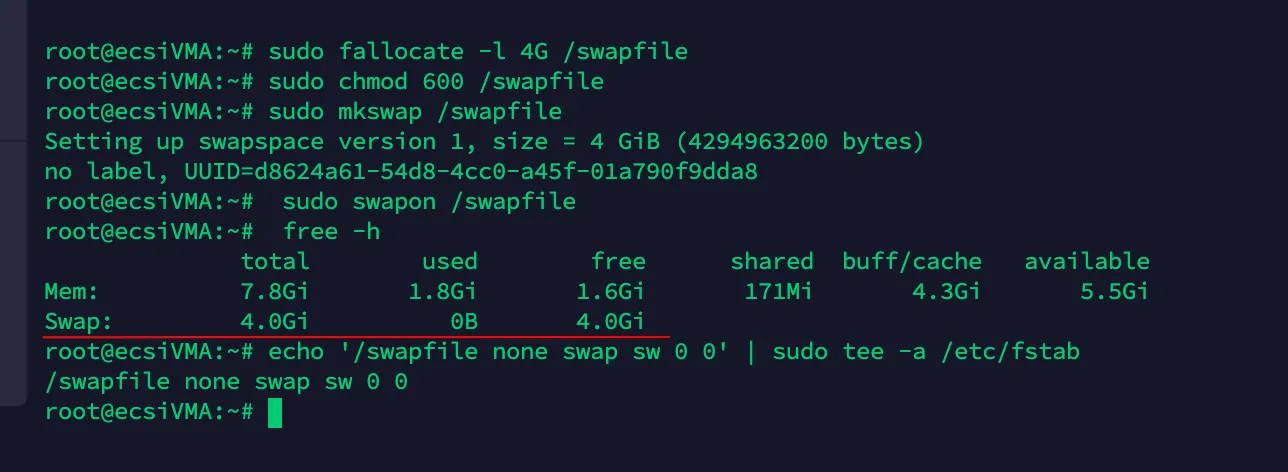
Implementation: Adding 4GB Swap to Ubuntu

Execute the following commands:

sudo fallocate -l 4G /swapfile
sudo chmod 600 /swapfile
sudo mkswap /swapfile
sudo swapon /swapfile
echo '/swapfile none swap sw 0 0' | sudo tee -a /etc/fstab

Check the result:

free -h

Example output:

Swap: 4.0Gi 0B used 4.0Gi free

An effective system protection mechanism is now enabled.

Adding Swap


Results: Stable Builds, No More OOM Kill

After adding Swap:

  • Build process is stable
  • SSH no longer disconnects
  • Containers are not mistakenly killed
  • Server no longer crashes unexpectedly

The previous frequent crashes have completely disappeared.


Summary

This troubleshooting experience taught me a profound lesson: having enough server resources doesn't mean having enough for peak loads.

For servers running multiple containers + build tasks, I strongly recommend:

  1. Monitor memory peaks: Don't just look at average usage
  2. Add Swap: As a system safety buffer
  3. Consider separating builds: Move CI/CD builds to dedicated machines or cloud services
  4. Set container memory limits: Prevent single containers from consuming all resources

I hope this article helps others facing similar issues to quickly identify and resolve their problems.